1Build and de-duplicate a sample corpus
Point a folder of samples at ke-simple. Identical bytes are stored once (content-addressed by SHA-256),
even when the same file arrives under different names or from different sources. Each upload adds a
bucket/key location and keeps the original filename as an alias.
bun run ingest --bucket malware-corpus --key-prefix family-a ~/samples/*.bin
# re-uploading the same bytes is idempotent; the corpus never stores a duplicate
Then browse buckets, tag by family, and pivot by hash, filename, or tag from the web UI or the API.
2Hunt for similar functions and binaries
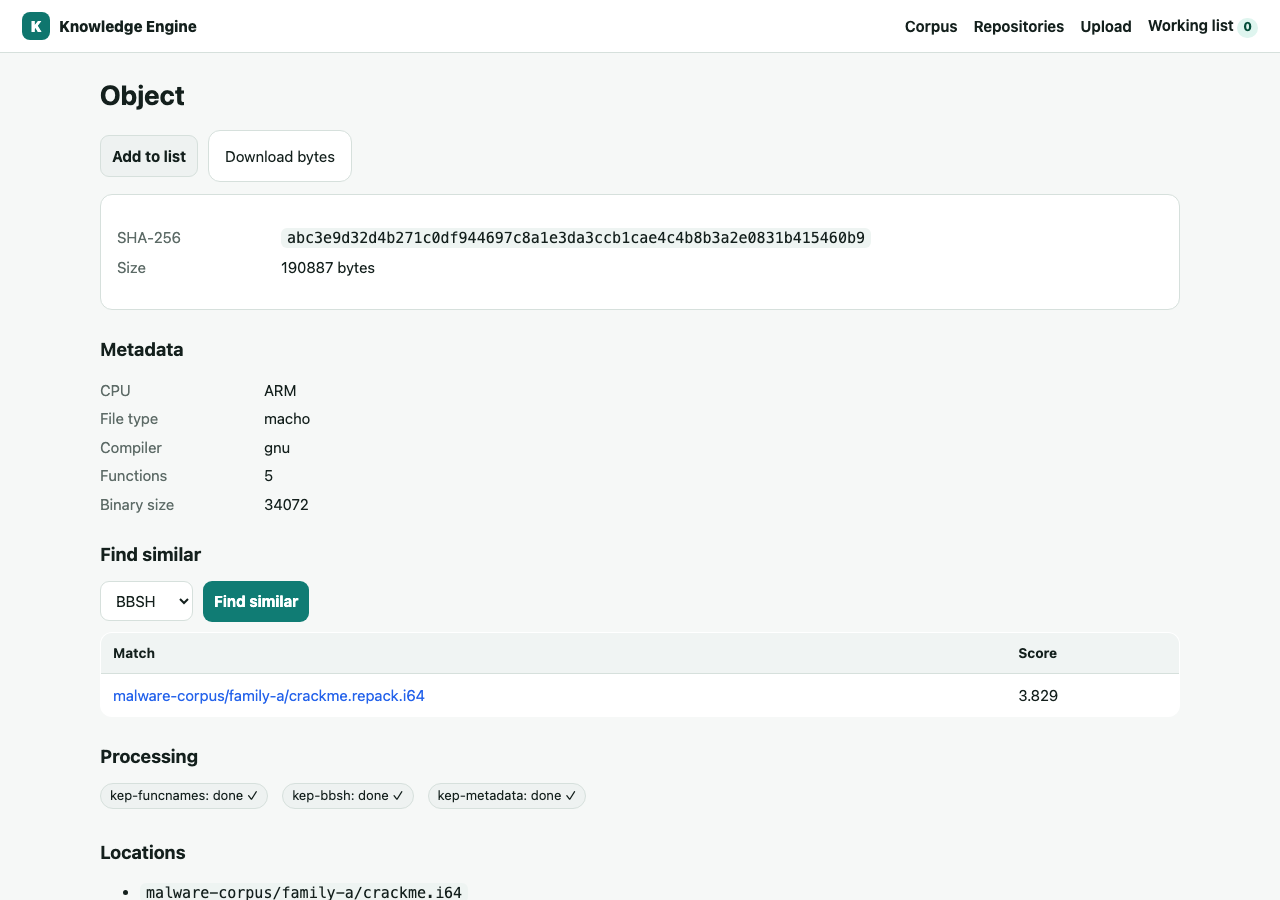
Given a known-bad sample, find structurally similar code across the corpus — even when names and bytes differ. Three independent angles, each a plugin:
- bbsh — basic-block hashing over IDA microcode (semantic structure).
- flake — flow-graph vector embeddings (pgvector nearest-neighbour).
- strings — shared embedded string literals.
# which binaries look like this one? (top 5, by shared microcode structure)
bun run operation kep-bbsh match_resource '{"bucket":"malware-corpus","key":"family-a/sample.i64","limit":5}'

# which functions elsewhere resemble the one at this address?
bun run operation kep-flake match_function '{"bucket":"malware-corpus","key":"family-a/sample.i64","address":4198400}'
In the web UI this is one click: open an object and use Find similar (pick the algorithm) — the same engine, with results linking straight to the matched objects.
3Identify library code with FLIRT
Store FLIRT signatures alongside binaries, match an unknown against the corpus of known libraries, and
download the matching .sig to apply in IDA — so analysts stop re-reversing zlib, OpenSSL, or
a vendored SDK.
bun run operation kep-flirt match_resource '{"bucket":"libs","key":"unknown.i64","limit":10}'
bun run operation kep-flirt get_signature '{"bucket":"libs","key":"libcrypto.sig"}' # base64 .sig to apply4Link IDBs to their source binaries — automatically
An IDB embeds the SHA-256 of the binary it was built from. ke-simple reads it (JS-only, no IDA needed)
and records an idb_for relation between the two by content identity. The link is
recorded the moment the IDB is processed and resolves whenever the binary arrives — either
order, no back-fill — and the IDB inherits the binary's tags.
5Search function names across the whole corpus
Find every binary that defines a function of interest — a decryptor, a known-bad routine, an exported symbol — regardless of which bucket it lives in.
bun run operation kep-funcnames search_function_name '{"name":"decrypt_payload","limit":20}'6Scope similarity by architecture or compiler
The metadata plugin records cpu, file type, compiler, and more. Similarity matchers join it, so you can restrict a hunt to, say, ARM PE binaries and skip cross-architecture noise.
bun run operation kep-bbsh match_resource '{"bucket":"corpus","key":"a.i64","cpu":"arm","file_type":"pe","limit":10}'7Collaborate through Git
Host repositories and push binaries and IDBs as you would to any Git host (IDBs travel efficiently via
the git-ida filter). A small .ke/actions.yml in the repo decides which files
become corpus objects, in which buckets, with which tags and which plugins run.
version: 1
rules:
  - match: "**/*.i64"
    bucket: idb-analysis
    tags: [ida, "{branch}"]
    process: [kep-bbsh, kep-funcnames]
Or go the other way: select objects while browsing and build a ready-to-clone repository from a
corpus selection — KE writes the files plus a matching .ke/actions.yml, so later
pushes project straight back in. (See the walkthrough.)
8Automate by hash
Pipelines never need the UI or even a bucket/key. Once a sample is in the corpus, fetch its exact bytes by hash, list everywhere it lives, or attach a tag — all over plain HTTP.
curl http://127.0.0.1:3000/objects/<sha256>/content --output sample.bin
curl http://127.0.0.1:3000/objects/<sha256>/locations
curl -X POST -H 'content-type: application/json' -d '{"name":"triaged"}' \
  http://127.0.0.1:3000/objects/<sha256>/tags
Full endpoint and CLI listings are in the Reference.